
How the GTS Ecosystem Operates
GTS coordinates customers, skilled field technicians, and regional franchise operators through structured, verified journeys. Select an audience to understand each operational flow.
Customer Workflow Walkthrough
Step-by-step progression through the GTS customer experience.
Explore Services in Customer App
Open the GTS Customer App and choose your pincode/locality to explore available doorstep services.
Provide Job & Location Details
Select the specific trade task, describe the repair or installation requirement, provide your address, and choose a preferred schedule.
Review Summary & Submit Request
Review the service parameters and submit your request. Regional systems dispatch and partner teams assign an available technician.
Follow Live Job Stages
Stay informed through real-time updates: Dispatched, Technician En Route, and Arrived at Doorstep.
App-Based Coordination
Communicate directly with the assigned technician through enabled in-app contact features for arrival directions or site access.
Inspect Work Satisfactorily
Once the technician completes the repair, personally inspect the completed job to ensure it meets your expectations.
Authorise Handover via OTP
Share your 4-digit Completion OTP with the technician only after you are satisfied with the inspection.
Share Rating & Review
Rate your service technician and leave constructive feedback to help maintain quality craftsmanship across the GTS platform.
GTS Customer App
(Android & iOS)
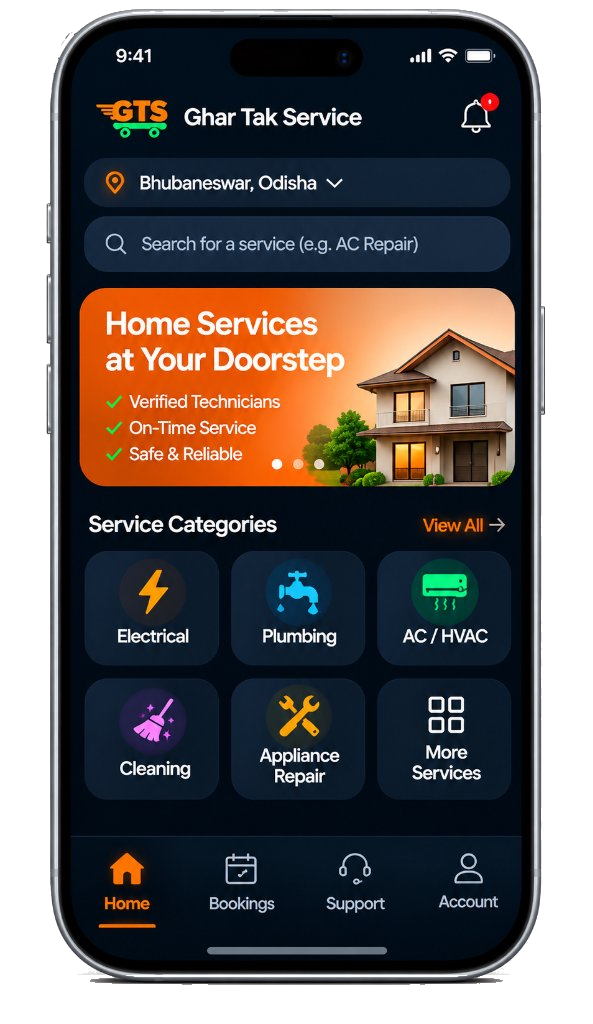
Conceptual representation. All actual bookings and operational dispatches are handled within the native application and portal software.
The GTS Two-Way Handover Protocol
To ensure customer peace of mind and technician protection, jobs in the GTS ecosystem require an explicit Completion OTP. The customer personally inspects the repair or installation before sharing the code. Once verified, the work is marked completed and recorded for settlement.